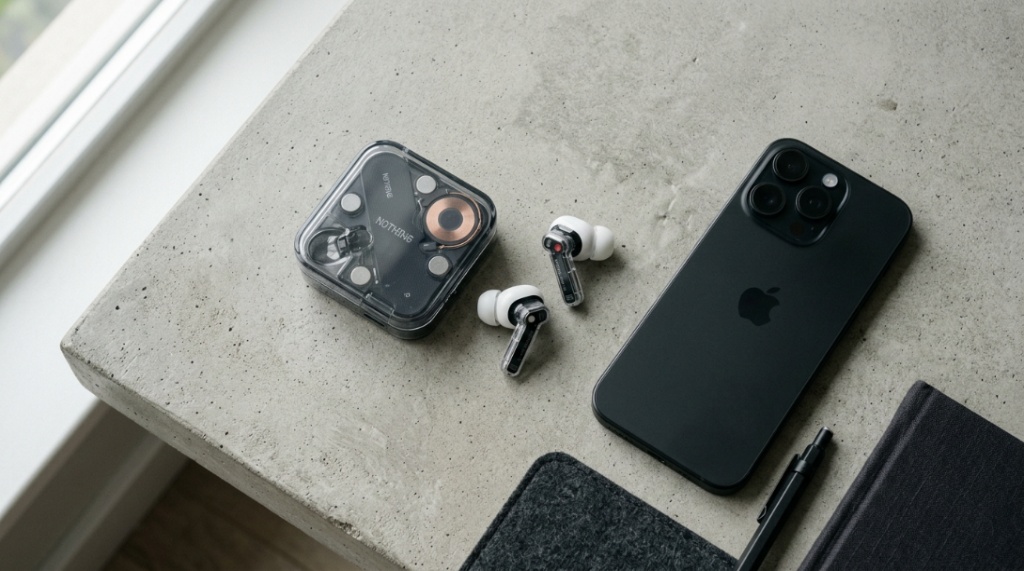
Nothing’s product lineup looks simple until you try to buy — then you realize there are four models within a $70 price spread, all with overlapping features that make the wrong choice feel like wasted money within a month. Affordable Nothing headphones range from $49 to $149, and paying more doesn’t always mean getting more value for YOUR specific use case. The money-wasting trap isn’t buying cheap — it’s buying features you’ll never use while underspending on the one capability that would’ve made the headphones perfect for your daily routine.
A headphone buying guide for Nothing products identifies which specific model delivers the features you’ll actually use daily at the lowest price that includes them — eliminating both overspending on unused premium features and underspending that leaves you frustrated with missing basics. The goal isn’t finding the “best” Nothing headphone objectively, but finding the best match between your needs and Nothing’s pricing tiers.
This guide maps Nothing’s current lineup against real usage patterns so you spend exactly the right amount — not a dollar more, not a frustrating feature less.
What’s the Actual Difference Between Nothing’s Headphone Models?
The core differences are ANC quality, driver tuning precision, codec support (LDAC vs. AAC-only), and case features. Sound quality and build construction are surprisingly close across the lineup — the pricing gap reflects feature depth, not fundamental quality leaps.
Model breakdown by actual differentiators:
| Feature | Nothing Ear (2) | Nothing Ear (a) | Nothing Ear Stick | Nothing Ear (1) |
|---|---|---|---|---|
| Price | $129–$149 | $79–$99 | $79–$99 | $69–$89 (legacy) |
| ANC | Advanced (adaptive, adjustable) | Good (standard, adjustable) | None | Basic (on/off only) |
| Codec Support | LDAC + AAC + SBC | AAC + SBC | AAC + SBC | AAC + SBC |
| Driver Size | 11.6mm custom | 11mm | 12.6mm (no seal — open design) | 11.6mm |
| Battery (Buds) | 6 hours (ANC off) | 5.5 hours (ANC off) | 7 hours | 5.7 hours (ANC off) |
| IP Rating | IP54 | IP54 | IPX4 (buds) | IPX4 |
| Wireless Charging | Yes | No | No | Yes |
| Best For | Audiophiles, Android hi-res users, premium ANC needs | Best value overall, daily commuters | Comfort-first users who dislike in-ear seal | Budget maximum, basic ANC needs |
The honest truth: the Ear (a) delivers 85% of the Ear (2) experience at 60% of the price. The premium you pay for the Ear (2) buys LDAC codec, wireless charging, and marginally better ANC — not fundamentally better sound or build quality.
How Do You Know Which Nothing Model Matches Your Needs?
Answer three questions: Do you need active noise cancellation? Do you stream hi-res audio from an Android phone? Do you specifically want wireless charging? If you answered “no” to all three, you’re spending money on the wrong model by buying the Ear (2).
Decision tree by need:
- Need ANC + hi-res Android audio + wireless charging → Ear (2) ($149): All three premium features justify the top-tier price. This is the complete package.
- Need ANC but don’t use hi-res audio → Ear (a) ($99): Strong ANC, excellent sound at standard codec quality, IP54, and saves $50 over the Ear (2). The smart default choice for most buyers.
- Hate in-ear pressure / ear tips → Ear Stick ($99): Open half-in-ear design with no ear canal seal. Zero ANC (open design can’t block noise). Best for people who find sealed earbuds uncomfortable.
- Maximum budget priority → Nothing Ear (1) ($69, if available): Basic ANC, lower IP rating, but still a Nothing product with above-average build quality for the price. Acceptable for casual, non-demanding use.
The money-wasting mistake: buying the Ear (2) for iPhone users who can’t access LDAC, don’t use wireless charging pads, and whose ANC needs are met by the Ear (a)’s implementation. That’s $50 spent on features that deliver zero value in their setup.
When Is the Nothing Ear (a) Better Than the Ear (2)?
The Ear (a) is better when you use an iPhone (LDAC unavailable), don’t own a wireless charging pad, and your noise environments don’t require maximum-tier adaptive ANC. For these users — roughly 60% of buyers — the Ear (a) delivers identical daily satisfaction at $50 less.
Scenarios where Ear (a) wins on value:
- iPhone users: iOS doesn’t support LDAC. Both models sound identical via AAC codec on iPhone. Zero benefit from the Ear (2)’s LDAC support.
- USB-C chargers only: If you don’t own a Qi wireless charging pad, the Ear (2)’s wireless charging capability sits unused forever.
- Moderate noise environments: Office, commute, gym — the Ear (a)’s ANC handles these capably. The Ear (2)’s adaptive ANC advantage shows mainly in highly variable noise environments (construction sites, busy airports).
- Gift recipients: If buying for someone else and unsure of their setup, the Ear (a) delivers maximum satisfaction probability at minimum risk of wasted premium features.
Where Should You Buy Nothing Headphones to Avoid Overpaying?
Buy from Nothing’s official site for launch pricing, Amazon for frequent sales (15–25% off during events), or Best Buy for in-store returns if fit isn’t right. Avoid third-party marketplace sellers offering “new” Nothing products below retail — counterfeit Nothing earbuds are increasingly common.
Pricing strategy by retailer:
- Nothing.tech (official): Standard retail pricing. First access to new launches. Official warranty guaranteed. No discounts except launch promotions.
- Amazon: Best for deals — Nothing products drop 15–25% during Prime Day, Black Friday, and periodic Lightning Deals. Verify “Ships from and sold by Amazon” to avoid counterfeits.
- Best Buy: In-store availability for fit testing before purchase. 15-day standard return, 60 days for Plus members. Price matches Amazon.
- Avoid: eBay “new” listings significantly below retail, unknown Amazon third-party sellers, and Facebook Marketplace “sealed” units. Counterfeit Nothing products replicate the transparent design convincingly but use inferior components.
For current pricing comparisons and verified deal tracking, the affordable Nothing headphones buying guide maintains updated pricing across authorized retailers.
What Hidden Costs Should You Factor Into Your Budget?
Factor in replacement ear tips every 12 months ($8–$12), a protective case cover ($10–$15 recommended), and potentially a USB-C cable if you don’t own one. Total first-year cost adds approximately $20–$30 to the purchase price.
True cost of ownership (first 2 years):
- Nothing Ear (a) total cost: $99 (earbuds) + $10 (ear tips year 1) + $12 (case cover) + $10 (ear tips year 2) = $131 over 2 years = $5.46/month
- Nothing Ear (2) total cost: $149 (earbuds) + $10 (ear tips year 1) + $12 (case cover) + $10 (ear tips year 2) = $181 over 2 years = $7.54/month
- Budget competitor (average): $49 (earbuds) + $10 (ear tips) + $49 (replacement at 12 months when they fail) + $10 (more ear tips) = $118 over 2 years = $4.92/month
The per-month cost difference between Nothing and budget competitors is minimal — and Nothing delivers substantially better daily experience throughout. The “savings” from cheaper headphones often evaporate with earlier replacement needs.
Many young adults look for budget-friendly audio options when they first start hitting the road solo. While picking out the perfect gear is fun, ensuring safety behind the wheel matters most; pass along these 5 Safe Driving Tips for Teens to keep them focused on the road ahead.
How Do You Avoid Buying the Wrong Nothing Model for Your Phone?
Check your phone’s Bluetooth codec support before buying. Android phones with Snapdragon chips typically support LDAC (making Ear 2 worthwhile). iPhones and budget Android phones are limited to AAC (making Ear (a) the better value since you can’t access LDAC regardless).
Phone compatibility guide:
- iPhone (any model): Limited to AAC codec. Buy the Ear (a) — you cannot access the Ear (2)’s LDAC advantage. Sound quality is identical on iPhone between both models.
- Android with Snapdragon 8-series: Full LDAC support. The Ear (2) delivers audibly better hi-res audio quality. Worth the premium if you stream Tidal, Amazon Music HD, or FLAC files.
- Android with MediaTek/budget processors: LDAC support varies — check your specific phone’s Bluetooth codec settings. If LDAC isn’t listed, the Ear (a) is your value play.
- Nothing Phone (1 or 2): Optimized integration with Nothing earbuds via Nothing OS. Both models work perfectly, but the seamless widget and quick-pair features make either Nothing earbud feel more premium on a Nothing phone.
What Features Do Most People Never Actually Use on the Ear (2)?

Three features that sell the Ear (2) at higher margins but go unused by most buyers: LDAC hi-res audio (requires specific phone + hi-res streaming subscription + hi-res source files), wireless charging (most people charge via cable anyway), and personalized ANC profiling (most users leave it on default).
Usage data reality:
- LDAC codec: Requires Android with LDAC support + hi-res streaming service (Tidal, Amazon HD, Qobuz) + explicit Bluetooth codec selection in settings. Most users never configure this — they stream Spotify at standard quality via default AAC.
- Wireless charging: Convenient when you already own a Qi pad. But most buyers charge earbuds at night via USB-C — the same way they’d charge regardless. It’s a nice-to-have that rarely changes actual charging behavior.
- Dual-device connection: Sounds essential but requires manual switching in practice. Most users default to one device 90% of the time.
- Personalized ANC sound profile: Available through the Nothing X app. Most users set it once (if ever) and never revisit it. The default ANC settings satisfy most environments adequately.
How Do You Return Nothing Headphones If They Don’t Fit?
Buy from retailers with generous return policies — Amazon (30 days), Best Buy (15–60 days depending on membership), or Nothing’s official store (30 days). Fit issues are the #1 return reason for earbuds, and you can’t determine long-term comfort from a 5-minute store trial.
Return strategy:
- Try all included ear tip sizes: Most people default to medium. Try small and large — the correct size often isn’t what you’d guess. Spend at least 30 minutes with each size.
- Test for 3+ days before deciding: First-day fit impressions are unreliable. Ear canal fatigue from new earbuds resolves after 2–3 days of short-session wear.
- Keep all packaging until certain: Most retailers require original packaging for returns. Don’t discard until you’re committed to keeping them.
- Document any issues: If returning for defect rather than preference, photograph the issue. This speeds up the return/replacement process significantly.
Conclusion
Choosing affordable Nothing headphones without wasting money requires honest assessment of three questions: Do you need LDAC? Do you need wireless charging? Do you need maximum-tier ANC? If yes to all three, the Ear (2) justifies its premium. If no to any of them, the Ear (a) at $79–$99 delivers nearly identical daily satisfaction without paying for unused capabilities. Buy from authorized retailers, factor in $20–$30 of first-year accessories, and give yourself at least 3 days of wear testing before committing.
Still comparing models? The detailed Nothing headphones buying guide breaks down real-world performance differences with audio samples and user satisfaction data.
Which Nothing model are you considering and what’s your primary use case? Share in the comments — specific situations get specific recommendations from the community.
Frequently Asked Questions
Are Nothing headphones worth it compared to AirPods?
For iPhone users: AirPods integrate more seamlessly with iOS features. For Android users: Nothing headphones deliver better value and equivalent or better sound quality. For cross-platform users: Nothing works equally well on both systems without ecosystem lock-in, making them the more versatile choice.
Which Nothing headphone has the best sound quality?
The Nothing Ear (2) with LDAC on a compatible Android device delivers the highest technical audio quality. However, via AAC (iPhone or standard streaming), the Ear (2) and Ear (a) sound nearly identical to most listeners. The Ear Stick has the largest driver (12.6mm) but its open design sacrifices bass response.
Can I use Nothing headphones with Samsung phones?
Yes — Nothing headphones work with all Android phones including Samsung. Samsung’s own Galaxy Buds offer tighter One UI integration, but Nothing headphones deliver comparable sound and build quality with broader device compatibility and distinctive design.
Do Nothing headphones go on sale often?
Yes — Amazon discounts Nothing headphones 3–4 times per year (Prime Day, Black Friday, periodic deals) with savings of 15–25%. Nothing’s official site rarely discounts. The best strategy: set Amazon price alerts via CamelCamelCamel and buy when the target model drops below your budget threshold.
Is the Nothing Ear (a) good enough for most people?
Yes. The Ear (a) satisfies 80% of wireless earbud users completely — it has good ANC, solid sound, IP54 water resistance, and reliable build quality. Only audiophiles streaming hi-res audio on Android or users specifically wanting wireless charging should consider spending more on the Ear (2).
How do I know if Nothing headphones are counterfeit?
Verify through the Nothing X app — genuine Nothing earbuds pair instantly and show firmware version. Counterfeits fail app recognition or show “unsupported device” errors. Additionally, check the serial number on Nothing’s official verification page. Physical tells: uneven transparent mold lines, poor hinge action, and missing regulatory markings inside the case.
What’s the best alternative if Nothing headphones don’t fit my ears?
If in-ear sealing earbuds don’t work for you, consider the Nothing Ear Stick (half-in-ear, no seal), Samsung Galaxy Buds FE (different stem angle), or Sony LinkBuds (open-ring design). Fit is highly individual — no single earbud shape works for all ear canals. Return and try alternatives rather than forcing uncomfortable fit.